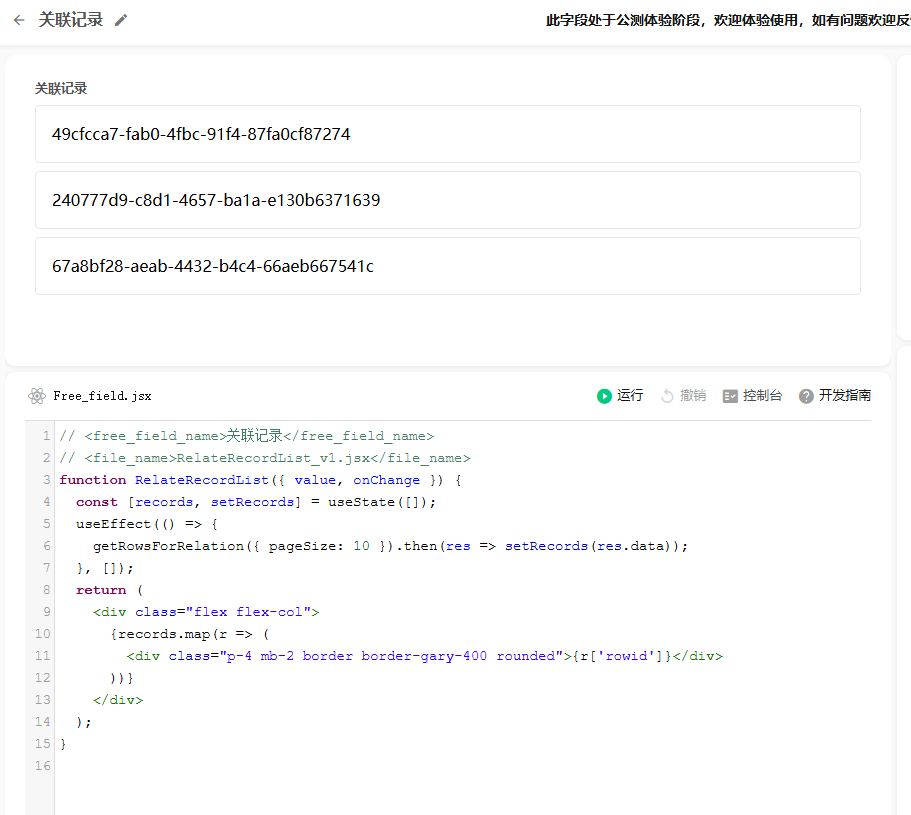
叫 AI 写只会模拟数据,无法连接到真的关联表,文档也找到有

感谢回复
这个是通过表中另外的关联字段来实现,不能像官方原生那种直接一个字段内部链接到关联的表吗
不然就只有显示的意义还是得有一个中间关联字段
是的 这个自定义字段本身存储为关联记录,同时引用了其他设置了默认值的关联多条记录字段从中取值
// <free_field_name> 图书封面选择器 </free_field_name>
// <file_name>BookPosterSelector_v1.jsx</file_name>function BookPosterSelector({ value, formData, env, onChange }) {
const [selectedBook, setSelectedBook] = useState(null);// 🔴 可选图书来源:关联记录字段
const options = getBooks(formData[env.book]?.value);useEffect(() => {
// 回显已选
if (value && value.startsWith('[')) {
const parsed = JSON.parse(value);
if (parsed.length > 0) {
setSelectedBook(parsed[0].sid);
}
}
// 默认选第一个
else if (options.length > 0) {
setSelectedBook(options[0].sid);
onChange(JSON.stringify([{ sid: options[0].sid, name: options[0].name }]));
}
}, [value, options]);/** 解析图书封面 */
function getBooks(fieldValue) {
const books = [];
const list = fieldValue && fieldValue.startsWith('[{') ? JSON.parse(fieldValue) : [];list.forEach(item => { try { const row = JSON.parse(item.sourcevalue); const files = row['695b549d7d731c30966d8881']; if (files && files.startsWith('[{')) { const img = JSON.parse(files)[0]; books.push({ sid: item.sid, name: item.name, url: img.thumbnailPath + img.thumbnailName.replace(/w\/200\/h\/118/, 'w/130/h/190') }); } } catch (e) {} }); return books;}
const handleClick = (book) => {
setSelectedBook(book.sid);
onChange(JSON.stringify([{ sid: book.sid, name: book.name }]));
};return (
{options.length > 0 ? ({options.map(book => { const active = selectedBook === book.sid;return ( <div key={book.sid} className={`w-[130px] h-[190px] border cursor-pointer ${ active ? 'border-blue-500' : 'border-gray-200' }`} style={{ borderWidth: '3px' }} onClick={() => handleClick(book)} > <img src={book.url} className="w-full h-full object-cover" /> <div className={`text-center text-xs font-bold ${active ? 'text-blue-700' : 'text-gray-700'}`}> {book.name} </div> </div> ); })} </div> ) : ( <div className="text-gray-400 text-sm mt-4 text-center"> 没有可选择的图书 </div> )} </div>);
}
感谢回复
这个是通过表中另外的关联字段来实现,不能像官方原生那种直接一个字段内部链接到关联的表吗
不然就只有显示的意义还是得有一个中间关联字段

// <free_field_name> 图书封面选择器 </free_field_name>
// <file_name>BookPosterSelector_v1.jsx</file_name>
function BookPosterSelector({ value, formData, env, onChange }) {
const [selectedBook, setSelectedBook] = useState(null);
// 🔴 可选图书来源:关联记录字段
const options = getBooks(formData[env.book]?.value);
useEffect(() => {
// 回显已选
if (value && value.startsWith('[')) {
const parsed = JSON.parse(value);
if (parsed.length > 0) {
setSelectedBook(parsed[0].sid);
}
}
// 默认选第一个
else if (options.length > 0) {
setSelectedBook(options[0].sid);
onChange(JSON.stringify([{ sid: options[0].sid, name: options[0].name }]));
}
}, [value, options]);
/** 解析图书封面 */
function getBooks(fieldValue) {
const books = [];
const list = fieldValue && fieldValue.startsWith('[{') ? JSON.parse(fieldValue) : [];
list.forEach(item => {
try {
const row = JSON.parse(item.sourcevalue);
const files = row['695b549d7d731c30966d8881'];
if (files && files.startsWith('[{')) {
const img = JSON.parse(files)[0];
books.push({
sid: item.sid,
name: item.name,
url: img.thumbnailPath + img.thumbnailName.replace(/w\/200\/h\/118/, 'w/130/h/190')
});
}
} catch (e) {}
});
return books;
}
const handleClick = (book) => {
setSelectedBook(book.sid);
onChange(JSON.stringify([{ sid: book.sid, name: book.name }]));
};
return (
return (
<div
key={book.sid}
className={`w-[130px] h-[190px] border cursor-pointer ${
active ? 'border-blue-500' : 'border-gray-200'
}`}
style={{ borderWidth: '3px' }}
onClick={() => handleClick(book)}
>
<img src={book.url} className="w-full h-full object-cover" />
<div className={`text-center text-xs font-bold ${active ? 'text-blue-700' : 'text-gray-700'}`}>
{book.name}
</div>
</div>
);
})}
</div>
) : (
<div className="text-gray-400 text-sm mt-4 text-center">
没有可选择的图书
</div>
)}
</div>
);
}