
代码块读取EXCEL文件内容
24 回复5279 浏览
这个主题,之前帖子已回复过实现方式,但是还是客户咨询配置方式。今天落实到单贴,详细步骤如下:
- 私有环境依赖库持久化 https://docs.pd.mingdao.com/faq/codeextension
- 解析 Excel 的类库,xlrd/openpyx :
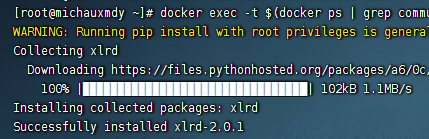
docker exec -t $(docker ps | grep community | awk '{print $1}') bash -c 'pip3 install --target=/usr/local/lib/python3.6/site-packages/ xlrd'
新版本 2.0.1 不支持解析 xlsx,所以需要指定版本 xlrd==1.2.0
![image.png]()
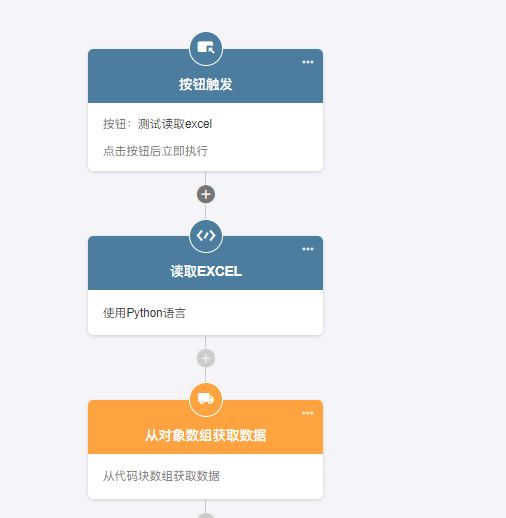
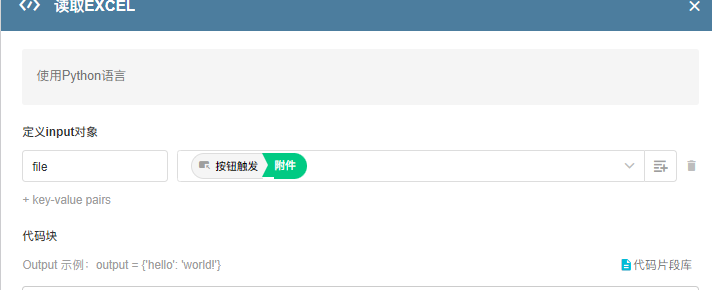
- 流程内代码块配置:
![image.png]()
![image.png]()
import xlrd
import json
file_addr=input['file']
import xlrd
import json
file_addr=input["file"]
file_http_path=file_addr[2:len(file_addr)-2]
file_path_list=file_http_path.split('?')[0]
file_path='/data/storage/data/'+file_path_list.replace('http://192.168.81.128:8880/file/','')
#http://192.168.81.128:8880 请替换为你的访问地址
book=xlrd.open_workbook(file_path)
sheet=book.sheet_by_index(0)
result=[]
rows=sheet.nrows
for i in range(1,rows):
  row_values=sheet.row_values(i)
  row_dict={
    "A":row_values[0],
    "B":row_values[1],
    "C":row_values[2],
    "D":row_values[3],
    "E":row_values[4]
    }
  result.append(row_dict)

output={'路径':file_path,'结果':result}
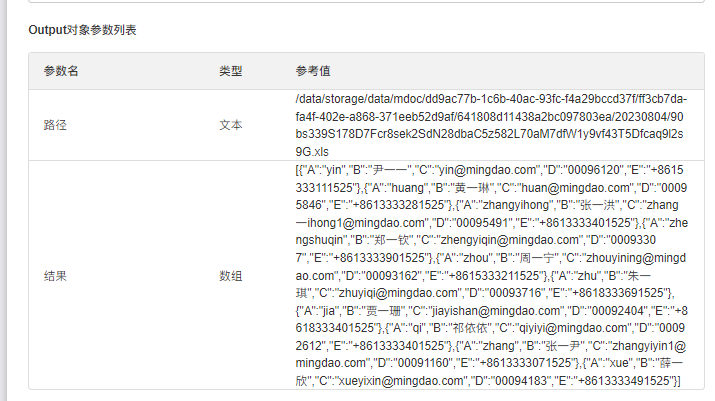
代码块返回的数组(可对于数据过滤后再输出),通过【获取批量数据】+【子流程/封装业务流】节点进行处理;如果数据量大,也可以在代码块内调用【工作表 API 接口】对于数据进行增删改。
-------以上只适用于单机版,文件存储集群模式下,将文件分片分散存储在多个独立的节点上;------
以下方案都适用
- 安装 python 的
pandas库 - 按下列流程配置
![image.png]()
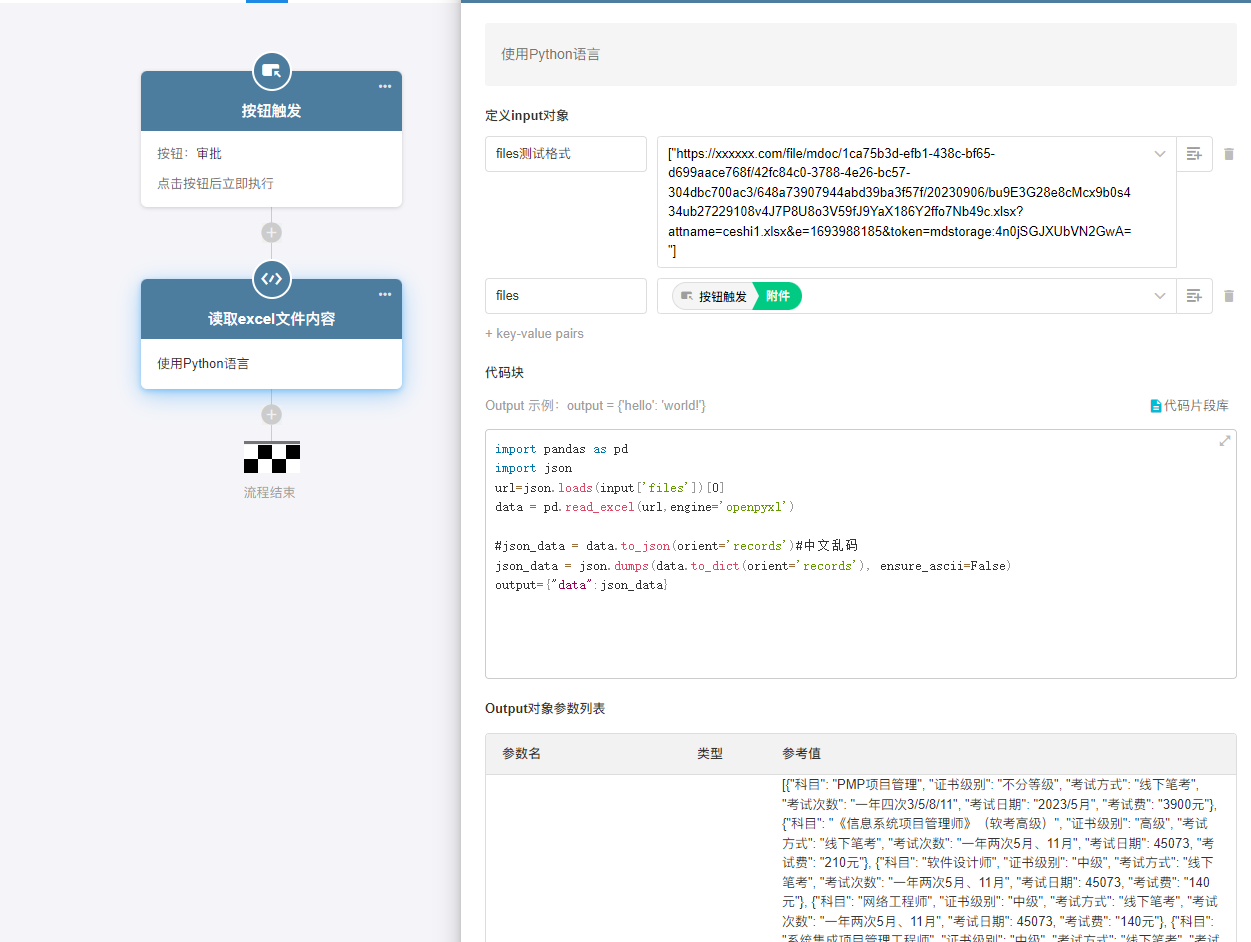
import pandas as pd
import json
url=json.loads(input['files'])[0]
data = pd.read_excel(url,engine='openpyxl')

#json_data = data.to_json(orient='records')#中文乱码
json_data = json.dumps(data.to_dict(orient='records'), ensure_ascii=False)
output={"data":json_data}





1.文件链接是有 token,有时效性; 2.如果文件名存在中文,那么在这里序列化后 get 会有这个问题。这种就需要通过工作表 API 获取文件的 downloadUrl 使用 参考这里 API 下载附件提示 Authorization Required 问题
我嘗試去讀文件内容,但是我的地址權限有問題,應該怎麽拿到有權限的 url 呢?
代碼:
import pandas as pd
import JSON
from io import BytesIO
import requests
url = json.loads(input['files'])[0]
response = requests.get(url)
#response.raise_for_status()
#return BytesIO(response.content)
output = response
報錯:
程序返回值序列化失败 <Response [401]> com.google.gson.stream.MalformedJsonException: Use JsonReader.setStrictness(Strictness.LENIENT) to accept malformed JSON at line 1 column 12 path $ See https://github.com/google/gson/blob/main/Troubleshooting.md#malformed-json
Excel 里面明细行可以读取嘛
参考下这篇 https://bbs.mingdao.net/topic/7856
等会我发一个帖子 说下应对大文件读取的方案
这个对 Excel 表格文件有行数限制要求吗?
js 怎么实现的
可以提下需求工单,产研来评估
张总,可否将类库 xlrd/openpyx 添加到公有云平台上,以便公有云上也能实现这个功能,谢谢!
实现了,用的 js,私信我
实现了吗?求方法
Below would be the error message that I got. Not sure if I missed anything during installation. Currently xlrd works fine.
I have added the line as suggested and now the xlrd example works without issues.
Only the pandas example is not working yet. But it is fine since the xlrd one is already working without issues.
Thank you for your advice.
I'm getting below response. Does this point that system is unable to find the python library needed? I have tried both examples above, but none is working. I'm not sure if there is any way for me to check if the python libraries is installed correctly. When I checked inside the command:node1018-python36 docker container, the files for xlrd and pandas exist in the /usr/local/lib/python3.6 folder.
You can inspect the docker-compose.yaml configuration file to determine if the storage mapping (/volume/data/:/data/) is configured under the "volumes" node of the "command" service. If it is not configured, please add it and restart the service
![4f26f1a77c498fb9073c3a1ed0423ea.png]()
I notice the installation is using "grep community". In my case as below, should I use "grep command" instead? I notice that if I used grep community, there is no pip3 installer in that docker.
Hi, I'm trying this code as above. However my file link can't be parsed properly into the python code. As you can see in the picture below, the file after mdoc is replaced with "apiapi". I'm not sure where this text comes from and my original link is modified.
🎉️
终于看到 Python 了 😄
看公有云的 Python 模块,一般是没有的
![image.png]()
私有各自的库也不一样,没有这个模块就用不了
想问一下如果我在私有部署版本里实现了这个功能,但其他处于非私有部署模式下使用明道云的同事还能使用这个功能吗?
👍
泉哥出品,比属精品!
能不能反过来把 JSON 作为入参生成对应的 xlsx 文件,并返回一个可以下载该文件的 url 作为返参?我想用明道做一个可以生成 Excel 文件的 API